You may have read something on this web site or in one of our guides that mentioned “unbound reports” in a less than favorable light. Hopefully this article explains what we mean by this.
What is an unbound report?
With the migration to the Business Objects XI platform many things changed. One of these changes was the method used to connect (or bind) documents to universes. I wrote an article on this binding and relationship, it is called “Business Objects XI – Changing BO Report / Universe Relationships“. So I won’t revisit that discussion beyond saying that in BOXI reports and universes are primarily and securely bound to each other through a set of unique identifiers of the objects: CUID and Object ID. If a report loses this relationship to its universe we call it and “unbound report”.
There may be other names for this phenomenon, but I believe this is the one the experts in SAP Business Objects use, and if they don’t I like it and I think it fits very well.
What causes a report to become unbound from its universe?
The basic event that occurs causing a report to become unbound from its universe is that the unique identifier of the universe is removed from the system. Some of the actions that remove this unique identifier may seem rather innocuous, but they can all be potentially deadly to your reports:
- Deleting a Universe: OK, this one is not innocent, but it is the most obvious and it actually has a few variants
- Replacing a Universe Using Designer: Many people use Designer to migrate universes from a development environment to a production environment. If during export you are prompted to “overwrite” a universe and you accept… kiss your report binding good-bye. If you quickly delete the original universe and then upload the new one, same story.
- Improper Use of Import Wizard: The “Merge” option causes so much trouble because it is not understood properly by many. If you use this or even if you use the much preferred “Update” option and you see that a new universe named with a “(2)” suffix was created, you haven’t ruined your report binding yet, but you next actions might. You must manually bind each report to the new universe with the “(2)” using the Java Report Panel to transfer the binding and make it safe to remove the old version of the universe. Failure to do this will fill your day with regrets.
-
The truth is that there are many permutations of actions that can lead to this. Many of them start with improperly creating backups of the universe (using Save as) and generating new unique identifiers for the modified universe. Others start with bad migration or promotion techniques.
But It Worked Fine in Business Objects 6.5
You are correct, but that doesn’t change anything. Remember, the game changed with Business Objects XI. The fusion with Crystal Reports created all new rules that Business Objects has barely explained to its customers. In BO65 the report-universe relationship was name based. Thinking this is still the case is the biggest issue facing Business Objects XI administrators and developers. Now it is all about unique identifiers and you can only maintain them by using the properly workflows.
I Followed a “Bad” Workflow but My Report Still Works, Why?
Many times unbound reports will continue to perform just fine, for a while. The first question is how long with that while be. The second question is, are you sure the report is using the right universe??? The CMS record of the report has meta data that lists a universe short name which many times will allow a report to find a universe to use. The problem with this is that it is unreliable and universe short names can change and be duplicated. In such cases a well-behaved unbound report might start to use a universe other than the one you intend or it might just fail. If it uses an unintended universe this could be a HUGE problem as it may not raise any errors to the end-user and the end-user may be making business decisions on wrong, bogus, or out-dated information!!!
The Nearly Unrecoverable Error – Error: WIS 00501
If your report cannot locate a universe, even with using the hidden short name stored in the report’s meta data then this is the error you will see:
Refreshing Data
Universe not found. See your Business
Objects Administrator. (Error: WIS 00501)
(Error: INF )
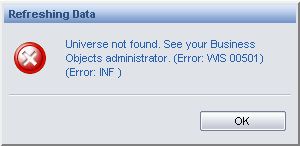
Once you see this error, you should expect the worst. In some rare and mostly undocumented cases some lucky BO developers have been able to recover from this issue by replacing the original universe. However, please don’t count on this; it is only worth an attempt.
So What are the Proper Development and Object Promotion Workflows?
I have hinted at a few and skimmed over others. To be honest there is a lot to discuss on this topic that exceeds the scope of a simple article. I am working on a new guide that details these workflows and how to properly design or retrofit a Business Objects XI system to best avoid these pitfalls and provide the maximum stability. As the guide materializes I will post some of the content here. I also hope to receive comments that will help shape part of the guide as well.
Hi Priti, I have not finished the guide that I spoke of in this article. I need to look at wrapping it up and making it available. Thanks for the reminder.
Hi All,
I think one of our universe is corrupted and the universe file is not being listed in CMC under universe Properties.
While trying to open the universe through infoview is throwing up WIS 00506 error and opening it through Designer is giving “There is no universe file attached to the universe infoobject”..
can you please tell me where is the universe file located on the frs..the full path (on the FRs or wherevr the universe is stored as a file)
I’m using BOXIR2 in a clusterd environemnt and the FRS is on a different server..
Thanks in advance.
KK
Hi KK, you should query the universe in Query Builder, this will give you a property that will tell you of the location of the universe file, or rather where it should be located. You could then search your FRS (directly, not through BO) and see if you can locate this file and put it where BO expects it. Try a query like this in the Query Builder application:
'
SELECT *
FROM CI_AppObjects
WHERE si_name = '
AND si_kind = 'Universe'
BTW, you might also be able to find the universe file on your PC and put it where Designer expects it and then upload it to the server, but this can be tricky.
Hi Julian,
Thanks for your fast response…As you might remember I am having issue with the query builder and hence not able to use it..
Anyways, I was able to solve this by exporting the local copy of the universe back to the repository. It was tricky but worked fine for me.
Hi Julian,
I have a concern regarding second point (Replacing the universe with the designer): I had lost a universe(It got corrupted somehow) and I was particulary concernd about the reports binding as the reports were very crucial and there were many of them. I retrieved the local copy of the universe through designer and exported it back to repository..I got an error message that this couldnot be exported as it already exist. so i renamed the one already in the repository and then exported it. The reports binding were maintained surprisingly. However, it should have been lost as per the second point listed above.
I was wondering you can provide an explaination for this.
Thanks in advance.
Hi KK, when you renamed the universe that was already present you did nothing to break the report binding to that universe. I suspect that all of your reports are still bound to that older universe, not the latest one that you uploaded. Am I right?
Is there a way to check it? now there are two universe file in the same folder. They should have different CUID..Can I check which CUID is used by the report binding?
Hi KK, yes you can. Just use Business Objects’ Query Builder tool to query first the reports and see which universe they are using (si_universe) and then query your universes to learn what their si_id are. Then compare the results and you will have your answer.
Hi KK, If you have the unfortunate episode of finding this article too late can you rectify a Universe by editing the CUID on the Universe (overwriting to an old value that you retrieved from a report)?
Or what other means can you point reports that are attached to a CUID that no longer exists as a universe has been overwritten?
The resolution to recreate the link between (unbound) reports and its universe is – I think – described in this Knowledge Base article from SAP (S-User required):
https://websmp230.sap-ag.de/sap/support/notes/1724737