Receiving the dreaded “No data to retrieve in …” or “There is no data corresponding to this query…” pop-up boxes can be confusing and disorienting for many end users. Heck, it even bewilders me sometimes when it pops up unexpectedly. The truth is that there are many occasions when this “error” is quite valid and even desirable. Like almost everything, it depends.
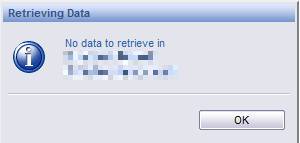
This is the error as seen from the InfoView Web Intelligence HTML Viewer
Causes for the “No data to retrieve in ” message
Firstly, let’s explain what causes this. Simply put one or more of the queries in your report is not returning any records. So what causes that to happen? Many things:
- The data is missing in the database. This one can be either expected or very scary for the the business intelligence administrator.
- The filters on the query are too restrictive or negating each other. Here the filters will also be a product of the values that you submit to any report-level prompts. Of course, if you for example select the value “Sacramento” for a city, the value “Chihuahua” for a state, and “India” for a country; then unless each prompt condition is joined to the other prompts with “Or” logic you should expect the “No data to retrieve” message.
- Row-level restrictions and other kinds of “universe overloads” can ultimately cause the final SQL submitted to the database to evaluate false for all records in the tables. This can be more subtle and can be revealed by studying the SQL.
- Universe connections can be changed and redirected to different database with similar structures but less or different data. No integrity or structure errors could be raised. This might also happen when moving a universe between environments and expecting the universe connections in all environments to be the same.
- Unbound reports can suffer from this. They can attach to different universes without anyone noticing on the front-end. This is especially true when more than one universe share the exact same objects. I have seen this with universes based on calendar years, for example.
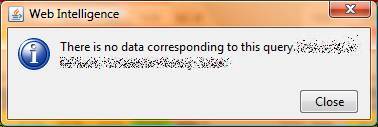
This is the error as seen from the WebI Java Report Panel
How do I suppress the “No data to retrieve” message?
There are times when you may expect that certain users will not receive data for any or all queries. In many cases, you have designed the report to handle this case, but you may not want the user to be bothered by the “No data to retrieve” message. This is a common requirement. There is a hard, non-standard way of suppressing the message using a VB macro or some other SDK integration, but I don’t recommend this route; too much overhead and too hard to maintain.
The easier way is to handle this at the query level. If you want to suppress the error, make the cause of the error go away. What? Yes! Create a union in your query such that always one of the queries returns a value. In some cases you can use queries you already have and just splice them together, but in most cases, the simplest way to create this is to add a second SQL UNION query with the same number of objects and object types in the “Result Objects” and make it always return one value. Then you may need to filter this value out of your reports by adding a simple report level filter in order to keep everything clean. You may also use this value in a variable or alerter to present the report user with your own custom message regarding the absence of data returned by the report queries.
Additional Notes
This error is seen in all forms of Web Intelligence (viewers and Java Report Panels) and Desktop Intelligence. The suppression method of creating a “UNION” in the “problem” query will work for all of the different flavors of reports. That is what also makes this a superior work around. When possible, I ALWAYS recommend avoiding the use of macros and other hacks that are not part of a standard BO solution. Of course, if you do use this 100% BO union hack then you may want to keep track of it in a document or in the report comments for future generations of report jockeys who may have to support it, migrate it, or reverse engineer it.
Well I do not mind getting a message, but for my end users I would like to just change the contents so that it is less confusing. The message “No date to retrieve”/”there is no data . . . .” gives the idea that the data warehouse is empty. It’s a too technical message. It’s like your computer giving a message “Partnr 7231-A2 is above 70 degrees Fahrenheit”. If the message would end with “but this is OK” it would not give the problem-feeling.
Further my users do not know the query names, and they will have the feeling there’s something going terribly wrong. You could start by naming your queries better. “No data to retrieve in FIN_TRANSACTIONS” is much clearer than “No data to retrieve in Query4”.
In my opinion it would better to have this message only in the editing mode for a report. Thus the error appears to the one that can deal with it. I personally find the union a horrible workaround, for every change implies changing two queries. A dummy line in your data is the other way.
But the base problem is that BO gives no choice in suppressing it for the end user.
HI,
I have a data in my universe(i.e. all the tables having the data in a univers),using that universe i created one report and run the report but i got a message like No there is no data corresponding to this query.but i am not using any filters or prompts in my query but still i am getting the same prob..can any one please help me in this issue????
thanks in advance
Hi chinnu, please take a closer look at the report. I would go to the “Edit Query” section and click on the “View SQL” button. Then I would take this SQL and execute it directly against the database. Since you say you have no filters, and all of the tables have data, then I would expect that the table joins are causing the problem (assuming you are selecting from more than one table).
I agree with Julian. It must be the join’s or maybe there is a derived table in your universe that causes it.
When taking a look at the SQL, you can identify the tables used in the objects. Split the query into loose queries per table and see why they do not join based on the value.
If the connecting fields in the database are not available in the universe, you could adapt the query, but leave the number of columns and their definition (e.g. number/var_char) intact.
It could be that a column value was not trimmed and then there is no match where you would expect it.
Hi,
In my WebI report I am querying from various tables but single universe. So far we were seeing WIj-30270,WIJ20002 & WIH 00013. So I thought of increasing the timeout setting in webI processing server to higher value(say >20 Mins…)Now the report runs exactly 3 or 4 seconds more than this value and throwing me ‘No data to retrive’, when again I changed the timeout value as old one I am getting previous errors. Confused!
Any thoughts?
Thanks,
Praba
Hi Praba, i would extract the SWL of that query and run it against the data source database directly. Make note of its behavior there and then you may have more insight into the issue.
Hi In my WEBI, I can able to generate report using some of the objects. When i try to generate a report in particular class,i got the error like “There is no data to retrive”.
Can any one please help me in this issue?
I got this error in one particular class. the reminig classes its fine.
Hi Surekha, your problem will be very specific to your universe and database; however, I can tell you that the SQL query that your report is generating is not returning any result from the database. So either the data is missing or the query, conditions, or universe is improperly constructed.
Split the query into loose queries and combine them within your report (maybe start with a subset). Than you will see why it doesn’t match. Maybe your universe tries to join on seemingly alike data, but one table has trailing blanks in character fields or e.g. decimals that do not show up through formatting. Another way is trying “outer joins”, then you can see which part of the data is missing. Good luck.
If objects from one class are working and objects from other class are throughing this kind of error in the sense, try to run the report win any single object from the second class.
Even then if you dont get any data, try to check the connection & DSN information to make sure about the database and data existance.
Thanks Julian and Marc
The issue got resolved
What happend here is, we have two servers and they pointed DSN to one server which is not the actual. That server dont have much data. Now we changed the DSN pointing server.Its fine.
Thanks for ur time
I have a report based on a single table with no where statement at the moment. About 16 fields of the fields that I want to return as set as NCLOB type in teh database and the objects are defined as long text objects. When I try to add more than 2 of the objects to the query I get a ‘No data to retrieve’ error. When I run the SQL directly in the database there are rows returned.
Is there a limit on the number of long text objects that can be in a single query?
Hi Susan, I think that you will need to force any CLOBs or NCLOBs into a standard supported SQL objects type like character, number, date, or Boolean. I can tell you that BO’s auditing database has a CLOB and it is usually accessed by converting it to a String (as seem in many of the Activity universe’s derived tables).
I have a report based on some universe.Some one deleted one of the object from the universe which was used in the report.When i try to refresh it, i get an error like “Some objects are nolonger avialable in the universe and contact your admin Error WIS 00001”. Is there anyway to findout that deleted object? Can we findout using datatracking option? or any funtion is avialable. Please help me in this issue.
Thanks in advance
Surekha
Choose Edit report. As soon as the report starts refreshing, enter the Cancel button. You can then open the report and see which column in your report is missing. If you go to the query, you can edit the query or get a message by running the individual queries that makes more sense.
Also, check for the combination of the objects you are using and if there is data available for each of the object.I was facing similar error message, i was getting data for all the dimensions but when i added a measure i got no data messgage, i replaced the measure with other one and lo i got the data…the earlier measure had no data for the combination of dimensions used.
Hi Julian,
we are Getting wis30270 dp process command error after migrating from xir2(windows) to xi 3.1 fp 3.4 linux environment(with oracle bo repository and DB for data). we are getting this error intermittently with many users. Can you please give some sugestions. Increased the webi servers and increased maxobejcts keep in memory also.. no use.
Hi Chethan, this is a generic error with many possible causes. One thing to check is that the Oracle client installed on the machines running WebI servers matches the BO connection version. Of course, make sure you have restarted the WebI servers (but I am sure you have since you installed Fix Pack 3.4. If none of this helps you will need to do some tracing to capture the error and then most likely raise a support ticket with SAP Support to have them analyze the issue. In fact, if at all possible, I highly recommend engaging SAP Support and push them to drive this issue to a solution. When you do get it solved, PLEASE reply back with your solution or any progress.
Hi Julian,
we have engeged SAP Support staff. But in the mean time we have enabled the trace and got the Invalid Token error.
“BOException caught:RESULT=80004005;WHAT=30111 : Invalid Token; found:dx5dx5dx37630_D_X_1277756363 expected: P29PI11059KT28”. Nothing Much Information. will update you once the SAP comes back with a solution. Do you have any idea what could be the issue with the above trace..
Hi Chethan, I have never had much luck at understanding the errors in a trace. In my experience the SAP Support team actually has to contact the BO product team for help in deciphering traces. You may also find that your trace may need to be deeper (more verbose), but the support team will indicate this if needed. BTW, are there any system logs or core files being generated with these errors? Are your WebI servers restarting themselves?
Hi Julian,
Your tips have been very helpful. :).. I am a newbee in the world of business objects and want to understand it in and out. Your recommendations are highly appreciated.. Also.. I am facing “No Data to retrieve” error when the query is run in BOXI.. The same query when ran against the db gives me the output.. Where can I look further for troubleshooting.. Some link is missing between BOXI n db may be ? Universe is corrupt ? I dont know.. If you could show me a way, I’ll be grateful …
Best Regards
Mayank
Thanks for the compliments. Assuming static data and that you are testing the SQL generated by the report (meaning you grabbed the SQL from the report and are using the EXACT same parameters, if any) the only differences that I can think of would be that the connection string could differ or that the connection user could vary. I’d like to see if others have any other things to check.
Hi Julian,
We have a CMC App( Centralized management console) . In that is stored the password for InfoView user and the thing which went wrong ( I Suspect) is that in CMC App there are 2 kinds of credentials available. Enterprise password settings and database credentials… If one changed the db credentials here… then as well the reports shall fetch “No Data to retrieve”. 🙂 Just thought to share ! Lemme know if I am missing something …
Just a tip: when you want to test if the sql will run with your universe, turn the sql into a “derived table” in the universe. If you run it from there and it gives no result and it gives results when running directly against the database, you will know that it has to do with your connenection, authorisation or your universe parameters.
Hi Marc,
1. When you say turn sql into a “derived table”, you mean to say that I should figure out which is the table that is being used in the report ? If yes, then I tried that and found the max(time) to understand if the data is coming to my db at the first place ( from the source , like Traffica etc )… and if you mean something else, please let me know. 🙂
2. How can I drill down to connection check ?
3. What exactly Universe parameters are you referring to here ?
PS: I am a newbee to BO.. your guidance is highly appreicated…
Hi Mayank, DB credentials are editable only from the Connection tool in Designer. This is also where you can check the connection.
BTW, a derived table is created in Designer (search the help on them). It is like a view except that it is maintained by BusinessObjects and not the database, also Derived tables can contain BO variables.
Worked like a charm! Thanks
Hi,
I wanted to know if it’s possible to specify in the user’s DeskI (BO XIR2) installation where to check for the tnsnames.ora file. For example – a user access the tnsora file on a network path, which he doesn’t have access to edit. Now he wants to add another database entry, which he can placed on his local tnsora file name and then specify in the somewhere that desktop intelligence needs to check his local tnsora file aswell, if it doesn’t find the entry in the default one used by his system..Is this possible?
regards,
KK
Hi KK, yes you can do this. However, this has nothing to do with Business Objects. You need to configure Oracle so that it will use this remote tnsnames.ora file. In the past, I accomplished this in older versions of Oracle by changing a registry key in the local machine’s registry or by changing the TNS_ADMIN environment variable.
I changed the query name to the cause of no data retrieval; i.e, Query Name : ‘due to date range exceeded 7 days’
There is hardly any other case in which no data is to be retrieved, so it worked for the sake of that report.
Thanks for replying Julian.. It actually solved my problem.
Thanks Again 🙂
Hi ,
When i run the report , sometimes i get no data retrived error of few queries which are in the report. But when i check those queires individually in database there is data and query runs fine.
There are not report level filters as well. Please advise?
Hi pushpa, I would compare the SQL exactly as it is generated by the report. I would also use the exact same user for the test as used by your Business Objects connection. Also, make suer you are running both queries at approximately the same time (as data can change over time).
Hi. Why would a query that works one day just stop working? I’m not sure scripts. Just building with front user objects and filters. I can rebuild it with the exact same criteria and it works, but the original just stops working. Why? Help?