Hard to Find CMC Settings Revealed
I imagine that the Business Objects development team had some heated debates about where to put various settings within the CMC application. However, I suspect that when planning out Business Object XI 3.0 and 3.1 some of the decisions were made by a single sleepless product manager with a grudge. I offer the following points as evidence supporting this suspicion. Actually, all joking aside, I am mostly writing this article for my own future reference, because I know I will forget where these selected settings are located.
Set Default Viewer URL
Honestly I wasted hours trying to find this in BO XI 3.1, on two different occasions. There is something about this one that fools my mind into forgetting where it is. This setting is essential to any administrator that uses a distinct web server, a server alias, a load balancer, or any other configuration that would change the URL users use to access the system from what BO thought it to be during installation. This URL is primarily used by BO when it sends out links to documents (using OpenDocument URLs), such as a scheduled job sending an email to users with a link to the refreshed report instance which resides with the Business Objects XI system. When you alter it, you really only want to alter the server and domain name portion.
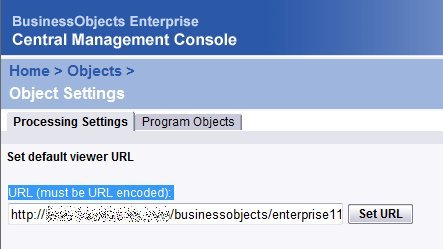
In XIR2 you can find the “Set Default Viewer URL” setting in:
CMC > Objects > Object Settings > Processing Settings
In XI 3.0 and XI 3.1 you can find the “Set Default Viewer URL” setting in:
CMC > Applications > CMC > Processing Settings
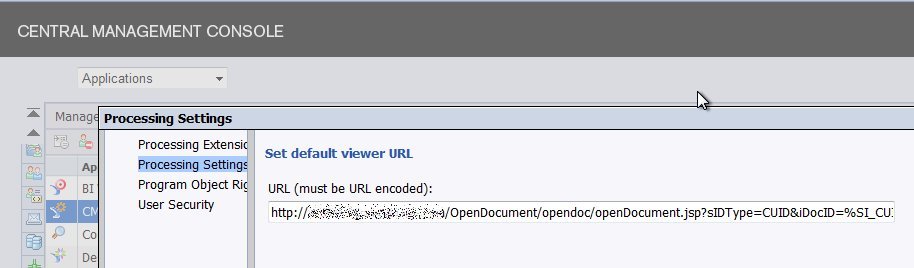
Yes, there is quite a bit of difference in the location of those settings. With practice you may be able to remember both for a few weeks, if you are like me. I suggest bookmarking this page for future reference.
Setting Document Instance Limits
Instances if left unchecked can destroy your system. Seriously, all it takes is a lack of instance limits and a refresh every 5 minutes job. If that doesn’t scare you start thinking about the fact that there is no limiter for inbox instances. By default the scheduled job instance limits are not too bad, but you can make them more restrictive and you probably should before your users get used to your surprisingly generous limits. The only problem you face if finding where to make this setting:
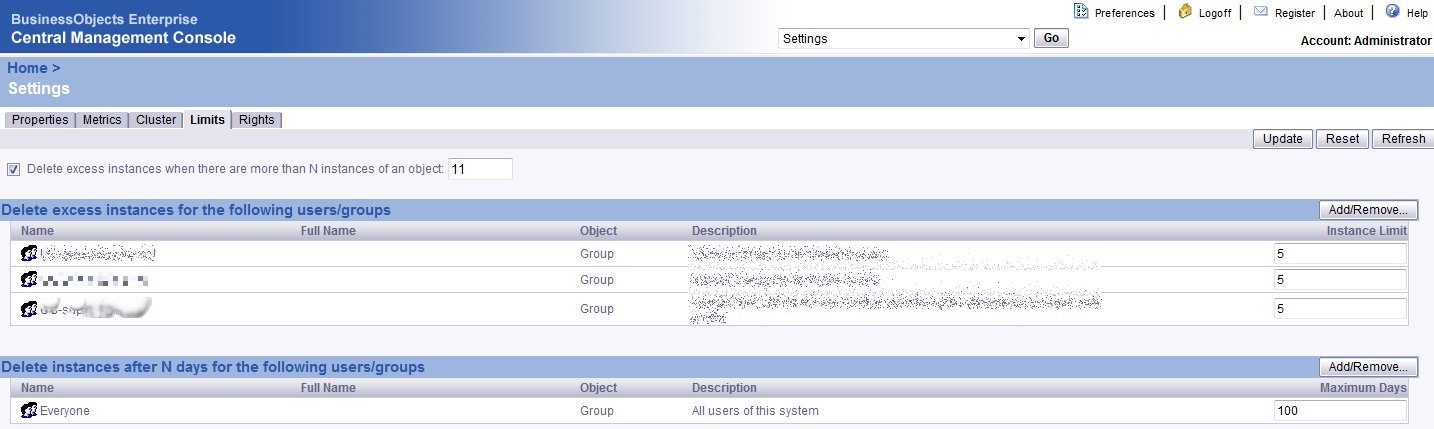
In XIR2 you can find the “Delete excess instances” and “Delete instances after N days” settings in:
CMC > Settings > Limits
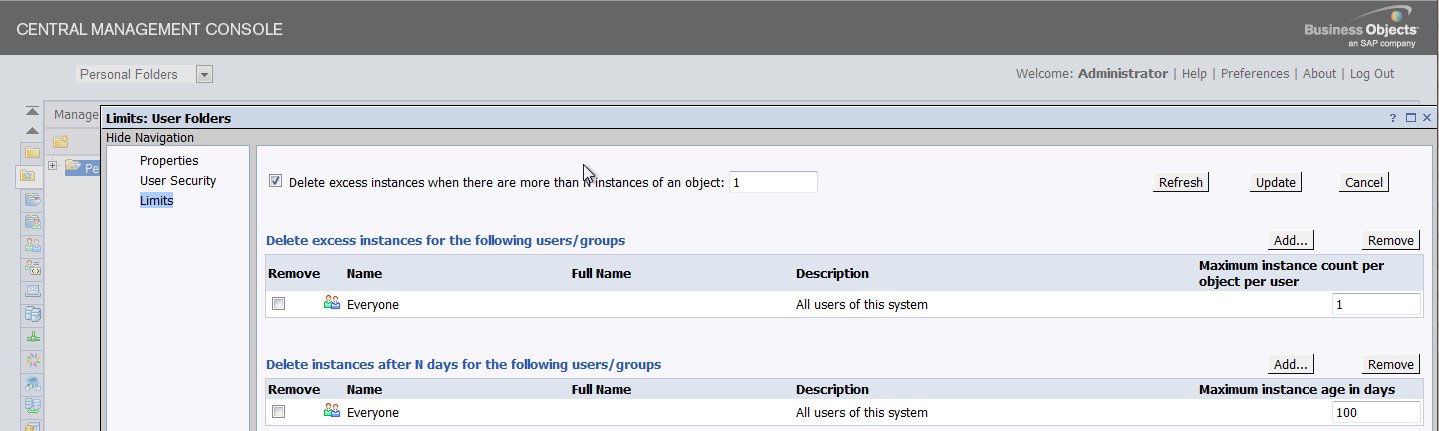
In XI 3.0 and XI 3.1 you can find the “Delete excess instances” and “Delete instances after N days” settings in:
CMC > Folders > (right-click top-level folder) > Limits
CMC > Personal Folders > (right-click top-level folder) > Limits
Final Words
If you want to share the location of any settings or configurations that you think are less than obvious please mention them in the comments and I will update the article with them as well to be sure that the search engines index them and help stop others developers from struggling because they can’t find the settings on their own.


Thanks a lot. I was looking for it.
Hi, thanks a lot.
Where in CMC the report image folder setting is available in XI R2 & XI R3? or is the path always default.
thanks,
Hi BO User, I am not sure what you mean by “report image folder”. If you mean the location where the report files and folders are stored than this is specified on the Input File Repository Server and Output File Repository Server. In XI 3.1 the default location is
\bobje\data\frsinputand\bobje\data\frsoutput, but you can change this to any path on the machine or even to a file share that is accessible from the machine.In your opinion, which is best?
Setting limits at root folder for # of days
or #of instances?
Hi Dawn, I always set both. For example, 32 days limit and 5 instances. Set this early, before you r users get used to something more generous and thank me later. Also, you can tweak this, depending on your security model, for different instance owners. In my system, public/corporate reports are always owned by Administrator in Production (because we use Administrator to promote them there with Import Wizard) and so I can apply different instance limits to Administrator.
Hi Julian,
Thank you for your advice. Can you expand a bit on your comment, “depending on your security model, for different instance owners”.
I appreciate your help.
Hi Dawn, if you security model segregates your users into a small number of groups then you could apply differing instance limits to these groups. For example, all super users may be allowed 10 instances while basic users may be allowed only 5 instances.
In BOXIR2 I have set the number of instances to 4 and also for the Everyone group to 4. The instances are not being removed. Is there something else I need to do?
Hi,
Are these limit settings hereditary? that is, will nested folders inherit this property from their parent folder?
Or do I need to set this manually for every folder?
Hi Ethan, the instance limits are hereditary. You should only really configure them for different user groups. These user groups will be used by the CMS when looking at an instance’s owner. Setting these for Everyone applies the setting to everyone.
Hi,
I am having an issue and I believe it is related to this URL. When we try to upload a object, I get the following error:
“The Web server received an incorrect or incomplete URL from the browser. Missing data argument: id”
Any suggestions?
Hi tlampe, can you provide more information about what you are attempting to do and what steps you are taking?
Hi,
I have one question related to deleting instances.
If the report is set to recurring & if we have a limit set to 50 for this report so this recurring instances will get deleted?
& if so what will happen if we remove the limit?
Will it affect the performance of the other report if we are having so many reports?
Any suggestion?
Hi Pya, a recurring instance is immune to the instance limit. The Business Objects instance limit applies only to non-recurring instances. If you raise, lower, or remove the instance limit you will only impact the number of non-recurring instances that are retained.
I would strongly recommend against setting this limit very high as this could kill your system. All it takes is one mistakenly scheduled refresh with a recurrence of every 1 minute to fill up the FRS storage quickly. Performance would not really be impacted too much, unless your database is poorly handling indexing and your hard disks become very fragmented.
Please help me, I want to delete existing instances, how do I delete existing instance, there are around 50000 instances. I have already limit to 3 but not able to delete existing instances
Hi Sahil, Normally a reduction in the limit should result in a reduction of existing instances within 24 hours after the change. I suggest you check back after 24 hours and confirm that your limit was properly set and application to “Everyone”.
hi all,
I am facing a very weird problem and that is,
I am not able to run more then 8 servers in a node/SIA.
I have created two different nodes/SIA’s with all default servers in them. Now when I run both SIA simultaneously then some servers of one of the SIA do not start. now when I stop 1 SIA then I am able to run all the servers in the running SIA.
I even tried making a SIA with only CMS in it and then tried adding servers manually but after i was done adding 8 Servers in running state, 9th onwards all the servers that I added failed.
I stoped one of the running server and tried starting a failed server and it started successfully.
Can any one tell me what could be the reason behind this..?
Hi Ranjan, I have not heard of this before. My initial thought is that it must be a limit in the resources of your system; however, I have run SIA (3.1 and 4.0) on some very under-powered virtual servers (1 CPU and 2 GB of RAM) and never had a problem running at least 16 servers in a SIA. Can you validate that you are running these on a server having at least 2 GB of RAM?
Hi Julian your final words are absolutly true.and as a devoloper I found this article saved my time.
Thanks a lot